|
|
| (34 intermediate revisions by 3 users not shown) |
| Line 1: |
Line 1: |
| Hello, world! This is a guide to the esteemed Twilight Princess Randomizer!<br />[[File:Randomizer logo.png|border|right|frameless|367x367px]] | | Hello, everyone and welcome to the Twilight Princess Randomizer! On this page, we will explore the land of Hyrule, go over what is new to the randomizer, what is the same, the generation process, and any other miscellaneous bits of information that you need to know about the randomizer and this specific release. You can also join the Discord server [https://discord.tprandomizer.com/ here]! |
| As TPR is still very early in development, a lot of things may change with every update. This guide will be maintained as much as possible to be current with releases. Note that this guide does not cover beta/alpha releases, it will only cover public releases.
| |
|
| |
|
| For setup instructions, go [https://rando.zeldatp.net/ here]!
| | '''The current version is: v1.3.0'''. The latest version can be found [https://generator.tprandomizer.com/ here]! |
|
| |
|
| '''The current version is: v0.20b'''. The latest version can be downloaded from the [https://github.com/zsrtp/GC-Randomizer/releases official Github repo]!
| | ==Overview== |
| | The Legend of Zelda: Twilight Princess Randomizer is a mod that shuffles various items in the land of Hyrule and places them into new locations to allow for a new, dynamic playthrough every time. To ensure that each seed is possible to complete, we utilize logical parameters to determine where an item can and cannot be placed. (Although these parameters do not exist if you choose to generate a playthrough with "No Logic".). |
|
| |
|
| ==The console window==
| | As with any game that has been modified from it's original state, it can be easy to get stuck and not know how to progress in the game. Please be sure to check out the [https://wiki.tprandomizer.com/index.php?title=Logic logic] page which contains information to assist in the transition from vanilla to randomized playthrough. |
| There is an interactive console that can be accessed via [[File:ButtonIcon-GCN-R.svg|frameless|40x40px]]+ [[File:ButtonIcon-GCN-Z.svg|frameless|40x40px]]. The controls are as follows:
| |
|
| |
|
| *Open/close console window: [[File:ButtonIcon-GCN-R.svg|frameless|40x40px]]+ [[File:ButtonIcon-GCN-Z.svg|frameless|40x40px]] | | ==Known Issues== |
| *Start randomization: [[File:ButtonIcon-GCN-R.svg|frameless|40x40px]]+[[File:ButtonIcon-GCN-Start-Pause.svg|frameless|40x40px]] | | Unfortunately, not everything is perfect and there are some issues that you may encounter during your playthrough. Please note that we are working in the background to solve these and they will hopefully be addressed in future versions: |
| *Increase value by 1: [[File:ButtonIcon-GCN-A.png|frameless|40x40px]] | | *Certain audio track replacement combinations cause the Audio Stream or Game to crash. |
| *Decrease value by 1: [[File:ButtonIcon-GCN-B.png|frameless|40x40px]] | | **Unfortunately Twilight Princess is a complicated game, sound-wise and rarely we sometimes encounter that some random sound effects don't play well together. |
| *Increase value by 10: [[File:ButtonIcon-GCN-X.svg|frameless|40x40px]] | | *Using the REL Loader on Console causes a Green or Black Screen |
| *Decrease value by 10: [[File:ButtonIcon-GCN-Y.svg|frameless|40x40px]] | | **If you create a new save file, save and go back to the title screen, this helps resolve the issue. |
| | *If you enter Sera's shop after clearing Faron Twilight without Shadow Crystal, you briefly turn into a wolf. |
| | **This doesn't cause any issues. It's just a little silly. |
| | *Certain music tracks sound like they are missing some instruments without BGM rando being enabled |
| | *Stealing a Bomb Bag from Iza and trying to sell to Barnes will steal your Bomb Bag. |
| | **This is more of a vanilla issue, but people reported it enough that we wanted to put it somewhere. Know the repercussions of the glitches you perform. |
| | *Ooccoo is just weird in rando. |
| | **Don't rely on her too much. |
| | *If the Boss Flag has an unexpected value when entering a boss room, it can cause unexpected behavior. |
| | *Attempting to change Tunics while wrestling Bo crashes the game. |
| | *Voiding out or Dying on the same frame you open a chest can cause you to lose the check |
| | *Shop bottle contents flicker. Not the end of the world, just a little odd. |
|
| |
|
| ===Page 1 - Settings=== | | ==The Console Window== |
| [[File:0.20-page1.png|thumb|Page 1 of the console]]Page 1 of the console has general console settings. The settings are:
| | There is a console that displays information about the playthrough that can be accessed at any time. The controls are as follows: |
|
| |
|
| *'''Color''' Change the RGBA color of the background of the console overlay. R=red, G=green, B=blue, A=alpha/transparency | | *Open or close the console using [[File:ButtonIcon-GCN-R.png|frameless|40x40px]]+ [[File:ButtonIcon-GCN-Z.png|frameless|40x40px]]. |
| *'''True pause''' Puts the game in a semi-paused state when the rando-console is active where all actors are frozen and none of the inputs are being sent to the game itself
| |
| *'''Input buffering''' Holding a button will fire that button every frame. No need for mashing (good for 1 cycle Bo wrestling and auto-rolls)
| |
|
| |
|
| | ==Setup== |
| | To set up the randomizer, you will need the following things: |
|
| |
|
| | *'''A Legally Obtained Copy of The Game''' This can either be in the form of a physical game disc or an ISO that you have dumped from your disk. The randomizer currently supports the Gamecube version of the game. |
| | *[Only applicable if you are loading the randomizer files onto a memory card.]'''Rel_Loader.gci''' This is the same file that was used in previous betas. This is a save file that has the Rel Loader that is used to load the randomizer. You can either use the .gci file or the Gecko Code to load the Randomizer. Both can be found [https://wiki.tprandomizer.com/index.php?title=REL_Loader here]. |
| | *[Only applicable if you are loading the randomizer files onto a memory card.]'''seedData.gci''' This file contains raw data created by the [https://generator.tprandomizer.com Generator] that is read by the Randomizer file. |
|
| |
|
| | ==Check Types== |
| | The following is a brief overview of the different kinds of checks that take place in the randomizer and how they operate. |
| | *'''Treasure Chests''' |
| | **Self explanatory. These are the items that you get from treasure chests. |
| | *'''Event-Based Items''' |
| | **Items received from cutscenes or received from in-game events. |
| | *'''Free-Standing Items''' |
| | **These are items that appear in the overworld. As of 1.0, the items render with the proper item model. |
| | *'''Gifts from NPCs''' |
| | **These are items that are given by Non-Playable Characters (NPCs). |
| | *'''Shop Items''' |
| | **Items that can be bought from shops. As of 1.0, the items render with the proper item model if the setting is enabled. |
| | *'''Golden Bugs''' |
| | **In 1.0, the golden bugs are replaced with freestanding items. This means that you won’t have to chase them everywhere. |
| | *'''Bug Rewards''' |
| | **Agitha gives a reward based on the bug that you give her. |
| | ***If the setting to shuffle NPC Gifts is disabled, Agitha will work like in vanilla. |
| | *'''Poes''' |
| | **Poes operate in a simple manner. You kill a poe, you get an item. |
| | *'''Hidden Skills''' |
| | **To get the item, you will need to howl at the stone and then a freestanding item will appear where the Golden wolf is. |
| | *'''Foolish Items''' |
| | **These are trick items that can be added into the item pool. If one is collected, then Link will take damage of some sort. |
|
| |
|
| | ==Logic and Randomization== |
| | The randomizer uses an assumed fill algorithm to place items. More info about the algorithm can be found [https://github.com/cjohnson57/RandomizerAlgorithms/blob/master/Paper/Paper.pdf here]. In short, it assumes that the player has all items and removes the items one at a time until there are no more items left to place. The randomizer also uses sphere based logic to place items, meaning that items are placed in dynamic layers called spheres where an item in a lower sphere cannot require an item from a higher sphere. |
| | *'''How is this different from the layered logic that the old beta used?''' |
| | **Layers are static, meaning that the same checks were in the same layer all the time and the same items were required to progress to the next layer. Spheres are dynamic and can have a different checks in them based on the items in the current and previous spheres. |
|
| |
|
| <br />
| |
| ===Page 2 - Seed===
| |
| [[File:0.20-page2.png|thumb|Page 2 of the console]]Page 2 of the console has custom seed data.
| |
|
| |
|
| This page is useful for when you want to resume an ongoing seed after having closed the game. See the section ''"Resuming a seed"'' for info!
| |
|
| |
| Has an option "Rando enabled" which enables/disables randomization. Changing this option does not affect your seed, it just gives you the vanilla items until you turn it back on. But doing this mid-seed will most likely causes issues!
| |
|
| |
|
| |
| ===Page 3 - Debug Info===
| |
| Page 3 of the console contains item check debug (useful for reporting bugs)
| |
|
| |
| Shows the active seed and checksum so you can share/resume the seed.
| |
| [[File:0.20-page3.png|thumb|Page 3 of the console]]
| |
|
| |
| '''Function/Source/Dest'''
| |
|
| |
| Technical stuff used by devs for debugging. Send them this info if you have an issue with getting a specific check!
| |
|
| |
| '''Total Checks/Layer Checks'''
| |
|
| |
| As it is right now, items are randomized into layers, or states. Each layer needs a specific item to access it.
| |
|
| |
| Total Checks: The total number of checks in the game
| |
|
| |
| Layer Checks: The total number of checks in your current accessible layer
| |
|
| |
| See the section ''"How the randomization works"'' for more info on how the layers work!
| |
|
| |
| '''Active Seed/Checksum'''
| |
|
| |
| Seed-specific stuff that must be noted down if you intend to share/reload the seed!
| |
|
| |
| Seed: The starting point for the randomization process. The checksum is determined from this. The seed and checksum work together to ensure that the set of randomization is unique.Checksum: The definite identification of the current active randomization, which derives from the seed and is identical between randomizer versions (unless the amount of checks changes between versions). This is the verification that the randomization set is unique.
| |
|
| |
| See the section ''"Resuming a Seed"'' for more info!
| |
|
| |
| <br />
| |
| ===Page 4 - Item Search===
| |
| [[File:0.20-page4.png|thumb|Page 4 of the console]]Page 4 of the console is the item search! Here you can search for an item via its hex value and it will show you the location of said item. Useful for debugging, <small>or cheating</small>.
| |
|
| |
| See the section "Using the item & check search" for more info!
| |
|
| |
|
| |
|
| |
|
| |
|
| |
|
| |
|
| |
| <br />
| |
| ===Page 5 - Check Search===
| |
| [[File:0.20-page5.png|thumb|Page 5 of the console]]Page 5 of the console is check search. Similar to Item Search, check out the "Using the item & check search" section for info!
| |
| <br />
| |
| ===Page 6 - Shuffled Checks===
| |
| Page 6 of the console contains a list of settings that change what items are shuffled.
| |
| '''Bugsanity'''
| |
|
| |
| (if true) Golden bugs will give random items and the bugs will be added to the item pool.
| |
|
| |
| (if false) Golden bugs will be vanilla. Does not affect Agitha rewards.
| |
|
| |
| '''Poesanity'''
| |
|
| |
| (if true) Poes will give random item when killed and poe souls will be added to the item pool.
| |
|
| |
| (if false) Poes will give poe soul when killed. Does not affect Jovani rewards.[[File:0.20-page6.png|thumb|Page 6 of the console]]'''Shopsanity'''
| |
|
| |
| (if true) Most shop items will be randomized. As this is an early version of Shopsanity, there are some caveats:
| |
|
| |
| *Ammo refills are ''not'' randomized
| |
| *When you purchase an unlimited item, first purchase will be randomized, but subsequent purchases will give a green Rupee
| |
| *To purchase Bottled items (eg. milk, larvae, potion, etc.), you must have an empty bottle in your possession.
| |
| *Scoopable items (eg. Trill's shop) are not randomized at this time
| |
|
| |
| (if false) Shop items will be vanilla.
| |
|
| |
| Note: This is a very early version of Shopsanity, so it will be improved as time goes on.
| |
|
| |
| '''Dungeon items'''
| |
|
| |
| (if true) Dungeon items will be randomized within their respective dungeons. Semi-Keysanity coming soon!
| |
|
| |
| (if false) Dungeon items will be in their vanilla locations.
| |
|
| |
| Note: Currently only affects Big Key, Compass, Dungeon Map, and Ooccoo)
| |
|
| |
| '''Key Shuffle'''
| |
| (if true) Randomizes Small Keys (in dungeons and overworld). Small Keys will only shuffle within there respective areas as currently keys are added only to that areas key count. Obtaining a key in a location that normally has none will not add that key to the area where it should be used but rather the current area the key was found in.
| |
|
| |
| (if false) All Small Keys will be vanilla.
| |
|
| |
| '''Skybooksanity'''
| |
| (if true) Randomizes each Skybook Character, so you can get a Skybook Character from anywhere, and it randomizes the vanilla check for them as well.
| |
|
| |
| (if false) Skybook Characters will be vanilla.
| |
|
| |
| <br />
| |
| ===Page 7 - Skips 1===
| |
| Page 7 of the console has some quality of life settings and skips.[[File:0.20-page7.png|thumb|Page 7 of the console]]'''MDH skip:''' Skips the Midna's Desperate Hour segment of the game between beating Lakebed Temple and getting the Master Sword.
| |
|
| |
| '''Faron escape:''' Removes the Midna trigger that normally prevents you from leaving Faron to Hyrule Field before completing Forest Temple.
| |
|
| |
| '''Open HF gates:''' Opens the gates in Hyrule Field allowing for early Lanayru province.
| |
|
| |
| '''Skip twilight:''' Skips the 3 twilights. They are auto-completed when you get vessel. You receive any missed portals as well as the Ending Blow hidden skill (as that is required to beat the game).
| |
|
| |
| '''Skip goats:''' Skips the 1st and 2nd goat herdings!!!
| |
|
| |
| '''Skip MS Puzzle:''' Skips the Master Sword statue puzzle, as the door to Master Sword is opened from start.
| |
|
| |
| '''Skip Escort:''' Skips the wagon escort with Telma because who really likes doing that? :p
| |
|
| |
| '''Skip Sewers:''' Skips the sewers (where you would meet Midna) and automatically gives you Midna and sense ability.
| |
|
| |
| Also shows debug info such as current stage/room, Link's position, and more.
| |
|
| |
| <br />
| |
|
| |
| ===Page 8 - Skips 3===
| |
| [[File:0.20-page8.png|thumb|Page 8 of the console]]Page 8 of the console has a couple more quality of life skip options available.
| |
|
| |
| '''Early CiTS:''' This option puts the sky cannon repaired in Lake Hylia so you can access the City in the Sky as soon as you have Clawshots and clear Lanayru twilight.
| |
|
| |
| '''Early Desert:''' Allows entering Gerudo Desert without having obtained Auru's Memo. If you talk to Fyer after clearing Lanayru twilight, you will have the oasis option without showing him the memo.
| |
|
| |
| '''Boss Keysey:''' Allows entering dungeons' boss rooms without the need for the boss key.
| |
|
| |
| '''No shop bottle:''' Allows you to buy shop bottled items (potions, bee larvae, etc.) without requiring an empty bottle. Useful in shopsanity.
| |
|
| |
| '''Fast transform:''' Allows you to quick transform (like in HD!) once you have the Shadow Crystal. To do so with the crystal in possession press [[File:ButtonIcon-GCN-R.svg|frameless|60x60px]]+[[File:ButtonIcon-GCN-Y.svg|frameless|60x60px]]
| |
|
| |
| '''Skip intro:''' Automatically skips the intro (fishing, buying Slingshot, goats 1/2), otherwise known as Ordon days 1 & 2. Starts you off in Link's house.
| |
|
| |
| '''Midna ToD Skip:''' Allows you to instantly swap the time of day to early night time or morning time akin to the Sun's Song. Once you have the Shadow Crystal press [[File:ButtonIcon-GCN-Z.svg|frameless|60x60px]] choose to Talk to Midna and wait till she is done speaking then press [[File:ButtonIcon-GCN-R.svg|frameless|60x60px]]+ [[File:ButtonIcon-GCN-Y.svg|frameless|60x60px]] to activate the effect as well as reload the current map.
| |
|
| |
| '''Early ToT:''' Having this option on opens the Temple of Time without needing the Master Sword and additionally adds the Sacred Grove portal for easy access to the area. The shortcut block after the skull kid section is also pushed down to skip needing to cross through the forest to enter the dungeon.
| |
|
| |
| '''Early PoT:''' Having this option on opens the Palace of Twilight without needing to repair the Mirror of Twilight and also adds the chambers warp portal.
| |
|
| |
| '''Open HC:''' Having this option on removes the barrier on Hyrule Castle that appears after Midna's Desperate Hour allowing access to the dungeon though this sequence will still need to be completed or skipped to remove the guards.<br />
| |
|
| |
| ===Page 9 - Skips 3/ Event Info===
| |
| [[File:0.20-page9.png|thumb|Page 9 of the console]]
| |
| Page 9 contains more skip options and some debug information.
| |
|
| |
| '''GM Story Flag:''' Having this option on gives you the dungeon clear flag for Goron Mines which have the following effects:
| |
|
| |
| *Friendly Gorons reside in Kakariko Village and Death Mountain.
| |
| *A poe will appear in Death Mountain.
| |
| *Bulblins disappear in Death Mountain.
| |
| *Talo sets up an archery game at the Kakariko Village watch tower.
| |
| *Barnes will start selling bombs.
| |
| *A goron child sets up a shop at night in Kakariko Village.
| |
| *Malo Mart will start selling Arrows additionally if Talo's archery is started the Hawkeye will appear in stock.
| |
|
| |
| '''Start w/ Crystal:''' This option gives you the Shadow Crystal at the start of the game enabling the ability to transform and warp immediately after meeting Midna for the first time.
| |
|
| |
| '''Hidden Skills:''' This option adds the Hidden Skills to the item pool (these are currently represented by large black chests that appear after you howl with the golden wolf).
| |
|
| |
| '''No Desert Requirements (No Logic build):''' This option removes the developer softlock prevention attached to entering Gerudo Desert without the ability to warp.
| |
|
| |
| '''All Portals (No Logic build):''' This options automatically unlocks every portal except Upper Zora's River (this portal triggers an event sequence with Iza warping the player to ask for help with a boulder).
| |
|
| |
| '''Story Items (No Logic build):''' This options adds the trade sequence items (ie Auru's Memo) that start appearing during the mirror shard portion of the game.
| |
| <br />
| |
| ===Page 10 - Cosmetic===
| |
| [[File:0.20-page10.png|thumb|Page 10 of the console]]
| |
| Page 10 includes a couple extra add ons to customize certain aspects of the game.
| |
|
| |
| '''Lantern Lighting:''' Seen in window as LTN IN LTN OUT these two values allow the user to edit the lighting color seen when holding the Lantern item.
| |
|
| |
|
| |
|
| |
|
| |
|
| |
|
| |
| [[File:0.20-page11.png|thumb|Page 11 of the console]]
| |
|
| |
|
| |
| ===Page 11 - BGM===
| |
| Page 11 contains options for randomizing the game's BGM (Background Music).
| |
|
| |
| '''BGM Rando:''' This option shuffles around all the games music tracks and properly plays them in stereo sound on all maps.
| |
|
| |
| '''No Enemy BGM?:''' This option toggles enemy encounter music to play or not though it does not affect special encounters that use specific tracks.
| |
|
| |
| '''Item Fanfares:''' This option shuffles the sounds that play when you receive an item.
| |
|
| |
| ===Page 12 SK Tracker===
| |
| Page 12 features a live tracker for small keys that updates as you obtain them (No Logic build).
| |
|
| |
| ==Custom chests==
| |
| There are 37 custom chests added in current release, that replace now skipped items.
| |
|
| |
| You can find them in the [[List of Randomizer Checks#Custom Checks|List of Randomizer Checks]]
| |
|
| |
| ==Resuming a seed==
| |
| Currently, the randomizer requires a little setup to pick up where you left off in a seed. If you play on the Dolphin emulator, you can make a save state and skip this process, as save states remember your seed data. Otherwise, read on!
| |
|
| |
| Page 2 of the console has custom seed settings. Go there and put in your seed data.
| |
|
| |
|
| |
| Example: Let's say page 3 says your active seed is 76ab5bee1a56fdce. When you want to resume that seed, your custom seed data should look like this:
| |
|
| |
| Seed 1: 76
| |
|
| |
| Seed 2: ab
| |
|
| |
| Seed 3: 5b
| |
|
| |
| Seed 4: ee
| |
|
| |
| Seed 5: 1a
| |
|
| |
| Seed 6: 56
| |
|
| |
| Seed 7: fd
| |
|
| |
| Seed 8: ce
| |
|
| |
| You must also have the same settings. Press [[File:ButtonIcon-GCN-R.svg|frameless|40x40px]]+[[File:ButtonIcon-GCN-Start-Pause.svg|frameless|40x40px]] to load the seed. Then verify that the checksum on page 3 is the same (in the example, it was 82e6).
| |
| ==Using the item & check search==
| |
| [[File:Randomizer-console-item-search-example.png|thumb|Item search page with example usage]]Page 4 of the console has the Item Search tool. This is somewhat technical, but you need the [[List of items|item list]] and the [[List of stages|stage list]]. You go to the item list page, do CTRL+F (or OS equivalent) and search for item you're looking for (eg. `Ordon Sword`). It will take you to the part of the sheet that has that item. You want to look at the far left column, the Hex column. The number you want is after the 0x. So in the case of Ordon Sword, that's `28. Take that number and plug it into the `Search ID` value in the console. It will return a result of the stage name (eg. `F_SP108`). With the stage name, go to the stage list and search for that stage name. In the case of `F_SP108`, it will return Faron Woods. Furthermore, if you add -> + room number, it will give you the room within that stage. In an example seed, Ordon Sword was in Room: 4. So search the stage list for `F_SP108`->`04` and that says Ordon Sword is in the Faron Woods Coro area (presumably either Lantern check or his bottle). At this time, Item Search does not support showing which exact check the item is at, just narrows it down to stage and room. The `ID` it shows before the stage is the vanilla item.
| |
|
| |
| ==How the randomization works==
| |
| As it is right now, items are randomized into layers. Each layer requires 1 item to access that layer (eg. Stallord layer requires Spinner). This means you are guaranteed Spinner before required to do Stallord. The same logic applies to all items. It ensures you'll have the item required to access the next layer before needing to do the next layer.
| |
|
| |
| The layers are in this order:
| |
| {| class="wikitable"
| |
| |+Logic Layers
| |
| !Layer
| |
| !Everything before (and including)
| |
| !Minimal item(s) to place in this layer
| |
| |-
| |
| |0
| |
| |Coro
| |
| |Fishing Rod, Lantern, Slingshot, Wooden Sword
| |
| |-
| |
| |1
| |
| |Ook
| |
| |Boomerang
| |
| |-
| |
| |2
| |
| |Goron Mines
| |
| |Iron Boots, Ordon Shield, Hylian Shield (Malo)
| |
| |-
| |
| |3
| |
| |Dangoro
| |
| |Hero's Bow
| |
| |-
| |
| |4
| |
| |Lanayru Spirit
| |
| |Bombs
| |
| |-
| |
| |5
| |
| |Enter Lakebed
| |
| |Zora Armor, Water Bombs
| |
| |-
| |
| |6
| |
| |Deku Toad
| |
| |Clawshot
| |
| |-
| |
| |7
| |
| |Master Sword
| |
| |Master Sword, Shadow Crystal, Ordon Sword
| |
| |-
| |
| |8
| |
| |Desert
| |
| |Auru's Memo
| |
| |-
| |
| |9
| |
| |Death Sword
| |
| |Spinner
| |
| |-
| |
| |10
| |
| |Snowpeak
| |
| |Coral Earring, Ashei's Sketch
| |
| |-
| |
| |11
| |
| |Darkhammer
| |
| |Ball & Chain
| |
| |-
| |
| |12
| |
| |Darknut
| |
| |Dominion Rod, Hawkeye
| |
| |-
| |
| |13
| |
| |Sky Cannon
| |
| |Full Sky Book
| |
| |-
| |
| |14
| |
| |Arealfos
| |
| |Double Clawshots
| |
| |-
| |
| |15
| |
| |Palace of Twilight (2 Sols)
| |
| |Light Sword
| |
| |-
| |
| |FF
| |
| |Everything
| |
| |Everything else (including Agitha's bug rewards)
| |
| |}
| |
| Each item check has two attributes to them: a `Source Layer` and a `Destination Layer`. A Source Layer asks at what layer can I place items here? And the Destination Layer asks at what layer can I place the item that was here?
| |
|
| |
| Note: A different randomization system for 1.0 is in the works that is better than the layers.
| |
|
| |
| Some items are not randomized currently. The following items will always be vanilla:
| |
|
| |
| *Fishing Rod
| |
| *Horse Call
| |
| *Scoopable items (eg. Trill's shop, SPR Pumpkin Soup, etc).
| |
|
| |
| ==No Logic==
| |
| This seperate build of the randomizer changes all of the shuffled items to appear absolutely anywhere with no concern whether or not the game is completable. Some extra features were added to this build in an attempt to make completion more doable in addition to a completely brand new one; '''Full Keysanity''' which allows the small keys to appear anywhere in the world.
| |
| ==Known issues/softlocks==
| |
| As the randomizer is still just a wee baby right now, you have to expect some issues in its current state. This is a list of known issues.
| |
|
| |
| *With a certain combination of skips on its possible to enter the Prince Ralis escort sequence in wolf form and it will not be possible to complete the sequence without resetting/powering off the game.
| |
|
| |
| For the most part, it's safest to get every check in every location before doing a major event (such as beating a dungeon). That will keep you safe from most current and future issues.
| |
|
| |
|
| ==FAQ== | | ==FAQ== |
| '''Q:''' Are there any trackers for this randomizer? | | '''Q:''' Are there any trackers for this randomizer? |
|
| |
|
| '''A:''' Yes. There are 2 trackers in fact! [https://tracker.zeldatp.net/ Lunar Soap's tracker] has a map and is more frequently updated, while [https://takarikka.github.io/TP-Tracker/ Taka's tracker] is good if you just care about marking off the items. Note that the trackers are not updated as frequently as the randomizer is, so they may lack some features. | | '''A:''' Yes. You can find a list of all trackers [https://wiki.tprandomizer.com/index.php?title=Trackers here]. |
| [[File:Mist-chest-locations.png|thumb|Shows the location of each of the 3 mist chests]] | | [[File:Mist-chest-locations.png|thumb|Shows the location of each of the 3 mist chests]] |
| '''Q:''' Are glitches required? | | '''Q:''' Are glitches required? |
|
| |
|
| '''A:''' No. | | '''A:''' It all depends on your settings. Glitchless seeds, as the name implies, do not require any glitches to complete. Glitched Logic seeds take certain glitches into consideration when placing items and may require them to complete the seed. No Logic seeds place items with no regard to logic, so it is very likely that you will need to use glitches to complete the seed. |
|
| |
|
| '''Q:''' I can't find the 3rd mist chest. I swear I looked everywhere! | | '''Q:''' I can't find the 3rd mist chest. I swear I looked everywhere! |
|
| |
|
| '''A:''' It gets us all... until we see the image to the right -> | | '''A:''' It gets us all... until we see the image to the right -> |
|
| |
| '''Q:''' Is Master Sword in the item pool/randomized?
| |
|
| |
| '''A:''' Yes, and so is the Shadow Crystal (the item getting Master Sword gives you in vanilla that allows transforming/warping). Both Master Sword and Crystal are separate items, and are therefore randomized separately as well.
| |
|
| |
|
| '''Q:''' Why is this randomizer so annoying to set up?!? I'm mad!!!!!!!!!!!1!!!! | | '''Q:''' Why is this randomizer so annoying to set up?!? I'm mad!!!!!!!!!!!1!!!! |
|
| |
|
| '''A:''' Calm your tits. It's very early stages of the randomizer, so a lot is still influx at the moment. If you want to play randomizer, you gotta do the setup. Otherwise, you're free to wait awhile for a better way to be made. | | '''A:''' The Rel Loader method is designed to work on vanilla hardware as well as on Dolphin and doesn't require you to transfer multiple GB of data each playthrough. A script to patch the iso with the randomizer is in the works at the moment. |
| | |
| '''Q:''' Why is this not more like x randomizer??
| |
| | |
| '''A:''' Twilight Princess is a different beast. Every game has their quirks and TP is no exception. It's also much less developed than many other randomizers in its current state (got its start in mid 2019)
| |
| | |
| '''Q:''' Can I use a premade savefile that's after goats/fishing because I really hate the beginning stuff?
| |
| | |
| '''A:''' Yes, but be sure you didn't use any randomized checks yet. And you have to enable randomization with R+Start inside the console to start it! The ideal spot to be is save after the cat steals your fish. When you load up that file, you can go straight into the shop and get 2 checks in the first 10 seconds.
| |
|
| |
|
| '''Q:''' Does disabling the `rando enabled?` option and getting a few vanilla checks, then turning it back on, have a chance to break anything? | | '''Q:''' I can't seem to get Dolphin to find my game in the game list. |
|
| |
|
| '''A:''' It could, depending on what those randomized checks were. Let's say you turned off rando, talked to Coro and he gave you Lantern (vanilla). Turn it back on and you won't get that check. But what if that check was Ball & Chain for example? You'd lose out on Ball & Chain forever. | | '''A:''' Go to Config -> Paths and add the folder that has your ISO to the Game Folders |
|
| |
|
| '''Q:''' Can I read? | | '''Q:''' Can I read? |
|
| |
|
| '''A:''' If you've made it this far, the odds are in your favor! | | '''A:''' If you've made it this far, the odds are in your favor! |
| ==I can't find an item! Help!!!!!==
| |
| If you can't find an item, the first step is to use Item Search (see section `Using the Item Search` for info!). If you verified that you checked all locations in that area (or if for some reason, search doesn't work as it should), it could very well be a bug. Here's what you can do to help diagnose it:
| |
|
| |
| In page 3 of the console, look at the `Function`, `Source`, and `Dest` values.
| |
|
| |
| *If Function, Source, and Dest did not change for this item, that means it wasn't randomized due to devs not knowing the trigger that gets called for that item
| |
| *If Source does not contain some -> and the Dest line says no replacement found for this source, it means the item check wasn't found, which could mean:
| |
| **The item check is absent from the code, or
| |
| **It could be in the code, but with incorrect data
| |
| *If Source looks something like F_SP08->5->7 and the Dest says No replacement here, it means the item check was found and already collected, which could mean:
| |
| **The trigger for getting the item might have been fired more than once
| |
| **There could be a problem with the logic
| |
| *If source and dest look like F_SP08->5->7, then the item check was randomized properly, so the item should be in the world
| |
|
| |
| If you can't find the item and any of the above happen, make sure you're on the latest version of the randomizer. Check at the top-right of the console window to see something like v0.14a © AECX. That number after the v is the version number. Check out the [https://github.com/zsrtp/GC-Randomizer/releases Official GitHub] to download the latest release!
| |
|
| |
| You can also join the Discord server for TP Randomizer [https://discord.tpspeed.run/ here]!<br />
| |
|
| |
|
| ==Miscellaneous== | | ==Miscellaneous== |
| If you're playing the randomizer on the Dolphin emulator, you may find [[Dolphin Guide|this guide]] useful. It has tips on lag reduction, how to use the recommended GCI folder and more. | | If you're playing the randomizer on the Dolphin emulator, you may find [[Dolphin Guide|this guide]] useful. It has tips on lag reduction, how to use the recommended GCI folder and more. |
Hello, everyone and welcome to the Twilight Princess Randomizer! On this page, we will explore the land of Hyrule, go over what is new to the randomizer, what is the same, the generation process, and any other miscellaneous bits of information that you need to know about the randomizer and this specific release. You can also join the Discord server here!
The current version is: v1.3.0. The latest version can be found here!
Overview
The Legend of Zelda: Twilight Princess Randomizer is a mod that shuffles various items in the land of Hyrule and places them into new locations to allow for a new, dynamic playthrough every time. To ensure that each seed is possible to complete, we utilize logical parameters to determine where an item can and cannot be placed. (Although these parameters do not exist if you choose to generate a playthrough with "No Logic".).
As with any game that has been modified from it's original state, it can be easy to get stuck and not know how to progress in the game. Please be sure to check out the logic page which contains information to assist in the transition from vanilla to randomized playthrough.
Known Issues
Unfortunately, not everything is perfect and there are some issues that you may encounter during your playthrough. Please note that we are working in the background to solve these and they will hopefully be addressed in future versions:
- Certain audio track replacement combinations cause the Audio Stream or Game to crash.
- Unfortunately Twilight Princess is a complicated game, sound-wise and rarely we sometimes encounter that some random sound effects don't play well together.
- Using the REL Loader on Console causes a Green or Black Screen
- If you create a new save file, save and go back to the title screen, this helps resolve the issue.
- If you enter Sera's shop after clearing Faron Twilight without Shadow Crystal, you briefly turn into a wolf.
- This doesn't cause any issues. It's just a little silly.
- Certain music tracks sound like they are missing some instruments without BGM rando being enabled
- Stealing a Bomb Bag from Iza and trying to sell to Barnes will steal your Bomb Bag.
- This is more of a vanilla issue, but people reported it enough that we wanted to put it somewhere. Know the repercussions of the glitches you perform.
- Ooccoo is just weird in rando.
- Don't rely on her too much.
- If the Boss Flag has an unexpected value when entering a boss room, it can cause unexpected behavior.
- Attempting to change Tunics while wrestling Bo crashes the game.
- Voiding out or Dying on the same frame you open a chest can cause you to lose the check
- Shop bottle contents flicker. Not the end of the world, just a little odd.
The Console Window
There is a console that displays information about the playthrough that can be accessed at any time. The controls are as follows:
- Open or close the console using
 +
+  .
.
Setup
To set up the randomizer, you will need the following things:
- A Legally Obtained Copy of The Game This can either be in the form of a physical game disc or an ISO that you have dumped from your disk. The randomizer currently supports the Gamecube version of the game.
- [Only applicable if you are loading the randomizer files onto a memory card.]Rel_Loader.gci This is the same file that was used in previous betas. This is a save file that has the Rel Loader that is used to load the randomizer. You can either use the .gci file or the Gecko Code to load the Randomizer. Both can be found here.
- [Only applicable if you are loading the randomizer files onto a memory card.]seedData.gci This file contains raw data created by the Generator that is read by the Randomizer file.
Check Types
The following is a brief overview of the different kinds of checks that take place in the randomizer and how they operate.
- Treasure Chests
- Self explanatory. These are the items that you get from treasure chests.
- Event-Based Items
- Items received from cutscenes or received from in-game events.
- Free-Standing Items
- These are items that appear in the overworld. As of 1.0, the items render with the proper item model.
- Gifts from NPCs
- These are items that are given by Non-Playable Characters (NPCs).
- Shop Items
- Items that can be bought from shops. As of 1.0, the items render with the proper item model if the setting is enabled.
- Golden Bugs
- In 1.0, the golden bugs are replaced with freestanding items. This means that you won’t have to chase them everywhere.
- Bug Rewards
- Agitha gives a reward based on the bug that you give her.
- If the setting to shuffle NPC Gifts is disabled, Agitha will work like in vanilla.
- Poes
- Poes operate in a simple manner. You kill a poe, you get an item.
- Hidden Skills
- To get the item, you will need to howl at the stone and then a freestanding item will appear where the Golden wolf is.
- Foolish Items
- These are trick items that can be added into the item pool. If one is collected, then Link will take damage of some sort.
Logic and Randomization
The randomizer uses an assumed fill algorithm to place items. More info about the algorithm can be found here. In short, it assumes that the player has all items and removes the items one at a time until there are no more items left to place. The randomizer also uses sphere based logic to place items, meaning that items are placed in dynamic layers called spheres where an item in a lower sphere cannot require an item from a higher sphere.
- How is this different from the layered logic that the old beta used?
- Layers are static, meaning that the same checks were in the same layer all the time and the same items were required to progress to the next layer. Spheres are dynamic and can have a different checks in them based on the items in the current and previous spheres.
FAQ
Q: Are there any trackers for this randomizer?
A: Yes. You can find a list of all trackers here.
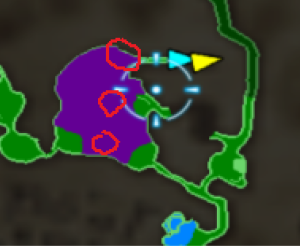
Shows the location of each of the 3 mist chests
Q: Are glitches required?
A: It all depends on your settings. Glitchless seeds, as the name implies, do not require any glitches to complete. Glitched Logic seeds take certain glitches into consideration when placing items and may require them to complete the seed. No Logic seeds place items with no regard to logic, so it is very likely that you will need to use glitches to complete the seed.
Q: I can't find the 3rd mist chest. I swear I looked everywhere!
A: It gets us all... until we see the image to the right ->
Q: Why is this randomizer so annoying to set up?!? I'm mad!!!!!!!!!!!1!!!!
A: The Rel Loader method is designed to work on vanilla hardware as well as on Dolphin and doesn't require you to transfer multiple GB of data each playthrough. A script to patch the iso with the randomizer is in the works at the moment.
Q: I can't seem to get Dolphin to find my game in the game list.
A: Go to Config -> Paths and add the folder that has your ISO to the Game Folders
Q: Can I read?
A: If you've made it this far, the odds are in your favor!
Miscellaneous
If you're playing the randomizer on the Dolphin emulator, you may find this guide useful. It has tips on lag reduction, how to use the recommended GCI folder and more.


